

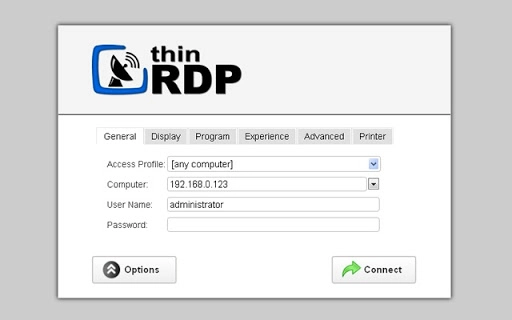
Description
Download ThinRDP – HTML5 Remote Desktop, Cross-Platform Access
Overview
ThinRDP is a desktop application designed to deliver secure, high-performance remote access to Windows desktops and applications through any modern web browser. Built for users who need to connect to remote systems from various devices, ThinRDP enables seamless access to local area network (LAN) resources, Windows Terminal Services, and virtualized environments such as RDS and VDI platforms. The software eliminates the need for complex client installations by leveraging HTML5 technology, allowing users to access their workstations or session-based applications without requiring Flash, Java, ActiveX, or Silverlight.
Target users include IT professionals, remote workers, system administrators, and organizations managing virtual desktop infrastructures. The solution is ideal for environments where employees use diverse devices—such as iPhones, iPads, Android tablets, Chromebooks, or Linux machines—to access Windows-based systems securely. With a single public IP address, ThinRDP simplifies network configuration and extends remote access capabilities across geographical boundaries. The software supports a wide range of web browsers, including Chrome, Firefox, Safari, and Internet Explorer 9 and above, with compatibility for older versions enhanced via the Chrome Frame plug-in.
Key Features & Capabilities
- HTML5-Based Remote Access – Enables remote desktop and application access through any HTML5-capable browser, eliminating the need for proprietary clients or plugins.
- Cross-Platform Compatibility – Supports Windows, macOS, Linux, Chrome OS, iOS, and Android, allowing users to connect from virtually any device.
- Secure RDP Over Web – Provides encrypted remote connections, ensuring data confidentiality when accessing sensitive systems over the internet.
- Integration with Windows Terminal Services – Allows access to session-based applications and virtual desktops hosted on RDS or VDI platforms.
- Single Public IP Support – Simplifies network setup by enabling remote access through a single public IP address, reducing firewall and NAT configuration complexity.
- Zero Client Setup on End Devices – Users can connect directly from their browser without installing additional software or plugins.
These features make ThinRDP suitable for remote work scenarios, IT support tasks, and enterprise-level virtual desktop deployments. For example, a technician can troubleshoot a user’s Windows machine from a tablet using only a browser, while a sales representative can access a company application from a Chromebook during a client meeting. The solution is especially valuable in hybrid work environments where flexibility and accessibility are critical.
User Interface, Workflow & Performance
The ThinRDP interface is designed around a web-based client model, meaning the user experience is delivered entirely through a browser. The UI is minimal and focused on functionality, with controls for connection settings, display options, and input device mapping. Navigation is straightforward, allowing users to initiate remote sessions with a few clicks after entering the server address and authentication details.
Workflow efficiency is enhanced by the absence of client installation, reducing onboarding time and maintenance overhead. Users can quickly switch between remote sessions or access multiple applications hosted on a single Windows server. The developer did not specify resource usage details, but based on general software behavior, ThinRDP is expected to operate efficiently with moderate CPU and RAM consumption, particularly when handling standard remote desktop sessions.
Stability is likely maintained through the use of proven RDP protocols and HTML5 rendering. However, actual performance may vary depending on network conditions, server load, and the complexity of the remote desktop environment. The software is designed to adapt to different bandwidths, though high-resolution or graphics-intensive sessions may require optimal network conditions for smooth operation.
Compatibility & System Requirements
ThinRDP is compatible with the Windows operating system and requires the server component to be installed on a Windows machine. The installation package is 15.2 MB in size, indicating a lightweight footprint. The software supports Windows Terminal Services and RDS/Virtual Desktop Infrastructure (VDI) environments, making it suitable for use in enterprise networks.
Platform compatibility information is limited to Windows for the server side. The client-side access is available through any device with a modern web browser that supports HTML5. Supported browsers include Internet Explorer 9 and later, Firefox, Chrome, and Safari. Older versions of Internet Explorer (8 and below) can be extended with the Chrome Frame plug-in to enable HTML5 functionality.
Exact system requirements were not listed. The developer did not provide additional system requirements. Users are advised to ensure their Windows system meets standard RDP server requirements for optimal performance.
Pros and Cons
Pros
- Zero client installation required on end-user devices
- Supports cross-platform access from iOS, Android, macOS, Linux, and Chrome OS
- Secure remote access using HTML5 and standard RDP encryption
- Easy deployment through a single public IP address
- Compatible with Windows Terminal Services, RDS, and VDI platforms
- Free to download and use
Cons
- Server-side component limited to Windows OS only
- Client-side experience depends on browser and network quality
- No official support for non-HTML5 browsers without additional plugins
- Performance may vary based on network latency and server load
- Advanced configuration may require technical knowledge
FAQ Section
Is ThinRDP free to use?
Yes, ThinRDP is available at no cost. The software can be downloaded and used without any licensing fees.
What operating systems does ThinRDP support?
The server component runs on Windows. The client-side access is available from any device with a modern web browser, including Windows, macOS, Linux, Chrome OS, iOS, and Android.
Do I need to install software on my device to use ThinRDP?
No. ThinRDP operates through a web browser, so no additional software or plugins are required on the end-user device.
Can I access my remote desktop or applications from a mobile device?
Yes. ThinRDP supports mobile devices such as iPhones, iPads, and Android tablets, provided they have a browser with HTML5 support.
Is ThinRDP secure?
Yes, ThinRDP uses standard RDP encryption and HTML5 security protocols to ensure secure remote connections. Users should still follow best practices for password management and network security.
Final Thoughts + CTA
ThinRDP delivers a modern, accessible, and secure solution for remote desktop access without the overhead of traditional client software. Its reliance on HTML5 and cross-platform compatibility makes it a powerful tool for remote workers, IT teams, and organizations managing virtualized desktop environments. While the server component is limited to Windows, the broad client-side support ensures that users can connect from nearly any device with a browser.
For those seeking a free, lightweight, and easy-to-deploy remote access tool, ThinRDP stands out as a compelling option. Its ability to work with RDS, VDI, and Terminal Services further enhances its utility in enterprise and hybrid work settings.
Download ThinRDP now and experience seamless, secure remote access from any device, anywhere in the world.
Guides & Tutorials for ThinRDP App for Chrome
How to install ThinRDP App for Chrome
- Click the Preview / Download button above.
- Once redirected, accept the terms and click Install.
- Wait for the ThinRDP App for Chrome download to finish on your device.
How to use ThinRDP App for Chrome
This software is primarily used for its core features described above. Open the app after installation to explore its capabilities.
User Reviews for ThinRDP App for Chrome 0
No reviews found





